Public sharing
Share AI-generated outputs with people outside the group through a public link, and control what they see.
Most AI-generated outputs can be shared with people outside the group through a link. The recipient does not need a BIIM account.
Who can share
- The owner — always
- Members — only those the owner has enabled individually
- Guests — never
Public sharing is owner-only by default. The owner switches it on for one member at a time from the member profile screen — see Invite Members and Roles and Permissions.
What can be shared
Six kinds of output can be shared. The Share button is always in the top right, but how many buttons sit beside it differs.
| Output | Where the Share button is |
|---|---|
| Research chat | The last of three buttons |
| Deep research | The last of three buttons |
| Idea board | The last of three buttons |
| Trend research | The only button |
| Chaos map | The only button |
| Ideation | The last of four buttons |
Step 1 — Open the share settings
Open the item, then select Share. The sharing panel opens, headed Manage who can view this chat.
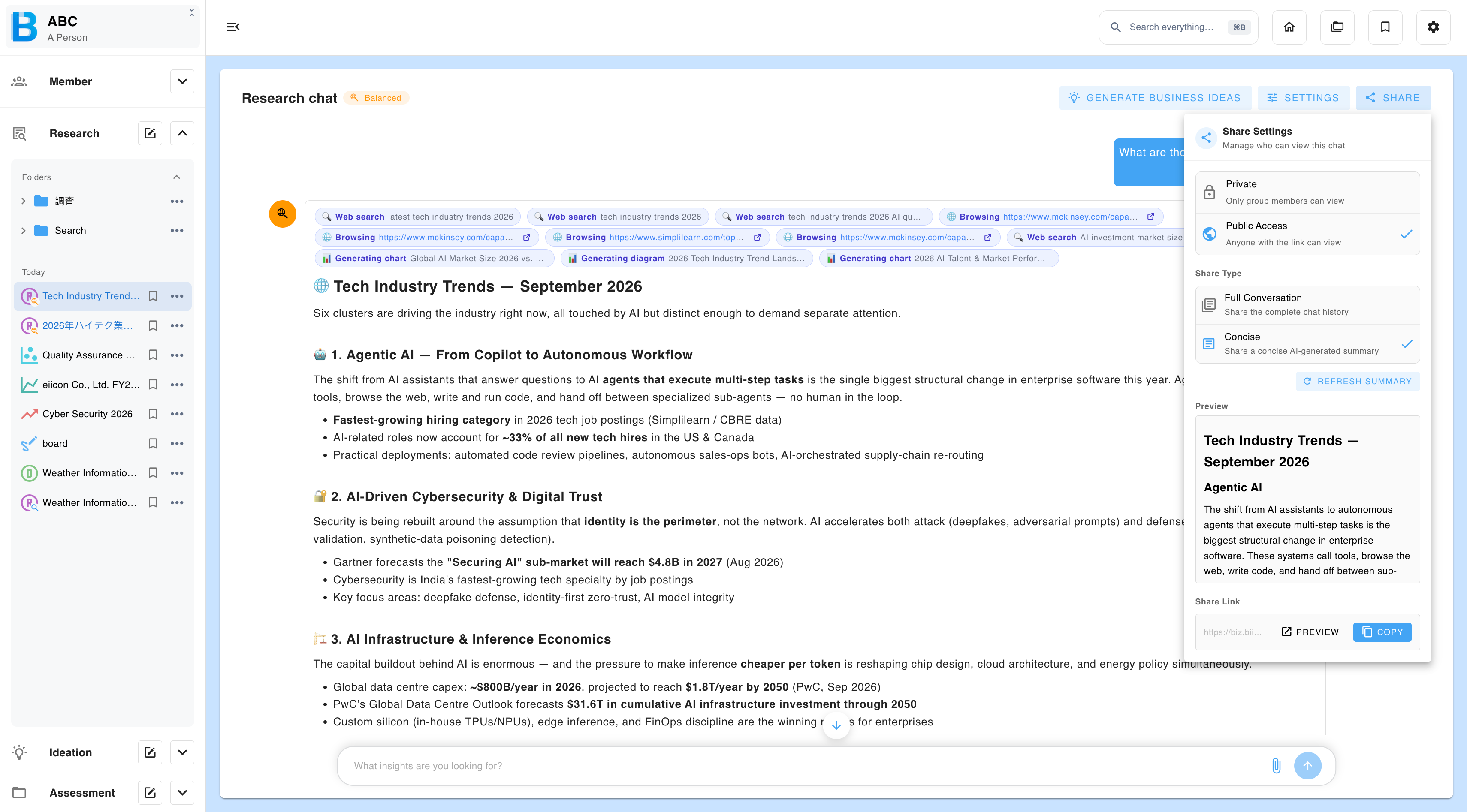
Step 2 — Switch to public access
| Setting | Who can view |
|---|---|
| Private | Only members of the group. This is the default. |
| Public access | Anyone with the link. |
Step 3 — Choose what the recipient sees
Research chat and Deep research offer two views. The other outputs are shared whole, so this step does not apply to them.
| Option | What the recipient sees |
|---|---|
| Full conversation | The complete chat history. |
| Concise | An AI-generated summary. If the summary is not right, regenerate it. |
Use Concise when the reasoning is internal but the conclusions are not.
Step 4 — Preview and copy the link
Preview the page to see exactly what the recipient will get, then copy the link and send it.
Anyone holding the link can open it without signing in. Treat a public link as published. Set the item back to Private to withdraw access.
What the recipient can do
| Output | What they see | What they can download |
|---|---|---|
| Research chat | The full conversation or the concise summary, including attachments, images, generated slides, web presentations, spreadsheets and graphs | Every attachment, plus the conversation as PDF, high-quality PDF or Word |
| Deep research | The full conversation or the concise summary, including attachments, images and graphs | Every attachment, plus the conversation as PDF, high-quality PDF or Word |
| Idea board | The complete board | The board as SVG, PNG or JPEG |
| Trend research | The complete trend research, with working source links | The graphs |
| Chaos map | The complete map, with working source links | - |
| Ideation | Every analysis and the AI chat, including attachments, images and graphs | Every attachment, plus the conversation as PDF, high-quality PDF or Word |
Auditing what has been shared
Every link created is logged. Owners can review the full list from the Public sharing tab — see Group Administration.